


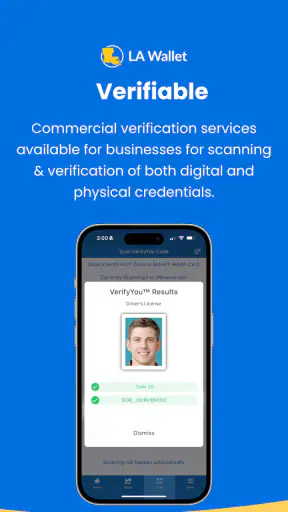
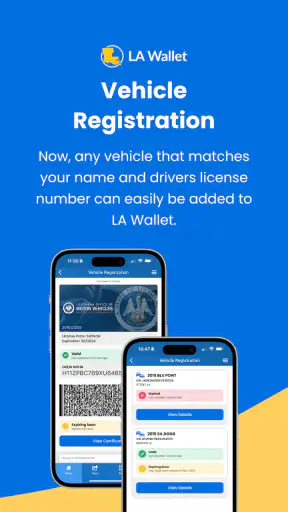
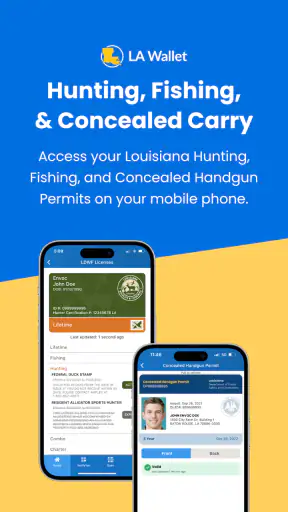
I approached LA Wallet as a practical travel-and-local utility rather than a flashy app. Developed by the State of Louisiana, it is built around a digital Louisiana driver’s license, so its value depends less on entertainment and more on whether it fits the moments when you normally reach for a physical card. My overall impression is that it can make everyday identification more convenient, but it rewards careful setup and realistic expectations.
The app is free and rated for Everyone, which makes it easy to try without committing money. It has been available since July 2, 2018, and its current version is 2.11.87. That history matters because this is not a brand-new experiment; it is an established state-focused app with a substantial audience. At the same time, a digital credential is not the same thing as a universal replacement for every document or every situation, so I would treat it as a useful companion to the physical license rather than an excuse to leave the physical card at home immediately.
Where the real friction usually begins
The first surprise is that the difficult part is rarely opening the app. The challenge is getting from installation to a credential that is ready when you need it. A state-issued identity product has to connect your use of the app with your actual Louisiana license, and that means small mismatches can become important. A name entered differently, an outdated address, an expired credential, or an interrupted verification step can make the process feel more complicated than a normal app sign-up.
I would begin with the assumption that the information you enter needs to match your official records closely. Avoid experimenting with abbreviations, nicknames, or alternate formatting just to make a form look cleaner. When a verification process involves a government credential, consistency is more useful than speed. I also recommend doing the initial setup at home, with your license available and enough time to read each prompt. Trying to complete it while standing in a queue or preparing to travel is an easy way to miss a step.
Another common point of confusion is the difference between having the app installed and having a usable digital license. Installation only puts the software on your phone. It does not, by itself, mean the credential has been added, verified, or is ready to present. If you open the app and see a setup request, that is not necessarily a malfunction; it may simply mean the account still needs to be connected to the relevant license information.
The app’s average rating is 3.9 from around 3K ratings, with roughly 1K written reviews. I read that combination as a sign of a useful but not universally effortless experience. People tend to judge identity apps harshly when a single blocked step prevents the whole purpose of the product, and that is understandable. A digital license has to work at the exact moment it is needed, not merely look polished during casual browsing.
What to have ready before setup
Before installing, I would make sure the phone is running at least Android 6.0 or a compatible supported system on the platform you use. I would also check that the physical Louisiana license is current and readable, then close other apps that might compete for attention during the process. This is not about turning setup into a technical project; it is about removing avoidable interruptions.
Use a stable internet connection for registration and any step that communicates with the state service. A weak connection can create an especially confusing result: the app may appear to stop, while the real issue is that a request did not finish. If something fails, I would wait before repeatedly submitting the same information. Multiple attempts can make it harder to tell whether the problem is a typo, a connection issue, or a temporary service response.
It is also worth checking that the phone’s date and time are set normally. Incorrect device time can interfere with sign-in and security-related processes in many apps, even when the visible error does not explain why. I would not change advanced settings or install unofficial tools to force LA Wallet through a blocked screen. For a government identity app, staying with the official app and ordinary device settings is the safer approach.
A calmer setup sequence
My preferred workflow is simple: install the app, open it on a reliable connection, read the instructions fully, and enter information exactly as it appears on the license. If the app requests a confirmation or verification action, complete that before switching to another task. Then close and reopen the app once the process appears finished. That last check is useful because it confirms whether the credential remains available after the initial setup screen disappears.
Take note of what the app shows after successful setup, rather than assuming that a confirmation message is enough. You want to know where the digital license appears, how quickly it opens, and whether you can recognize its status without searching through menus. This is one of the less obvious advantages of testing it before a real-world need: you discover the route to the credential while relaxed, not when someone is waiting for you to present identification.
I would also keep the physical license nearby during the first few uses. That is not a criticism of the app; it is sensible backup planning. If the phone battery is low, the device is damaged, or the app needs an update at an inconvenient time, the physical card remains the dependable fallback. A digital copy improves convenience only when the surrounding conditions cooperate.
Recovering from a blocked or incomplete workflow
When LA Wallet appears stuck, I would first identify the exact stage where it stopped. There is a meaningful difference between being unable to open the app, being unable to sign in, being unable to complete verification, and seeing the license but not being able to present it as expected. Treating all four situations as “the app is broken” usually leads to unhelpful repeated actions.
If the app will not open, the basic recovery path is to close it, restart the phone, and try again on a stable connection. Confirm that the operating system meets the minimum requirement and that the app is installed from the official store. An update may be relevant if one is offered, especially when an older installation behaves differently after a phone system update. I would avoid deleting the app immediately, because removing it can erase local state and force you to repeat setup without proving that reinstallation will solve the original issue.
If sign-in or verification fails, carefully compare the information being entered with the physical license. Pay attention to spelling, spacing, and the order of names. Do not guess at an alternative version simply because it looks more familiar. If the information is correct and the connection is stable, pause rather than making a long series of attempts. A short break and a fresh attempt later can distinguish a temporary service problem from an information mismatch.
If the credential was previously visible but is no longer appearing, I would check whether I am using the same phone account and app installation as before, then restart the app. I would not assume that clearing every piece of app data is harmless. For an identity-focused application, destructive troubleshooting should be a last resort, followed by setup through the official process again. Keep the physical license available in case the recovery takes longer than expected.
One practical habit helps more than people expect: open the app before leaving for an important appointment. This lets you discover a sign-in prompt, an update request, or a connectivity issue while there is still time to use the physical card. I would especially do this before driving somewhere unfamiliar, crossing a busy area, or attending an event where stopping to troubleshoot would be awkward.
When the app is not the cause
Not every failed presentation points to a software defect. A dead battery, a locked phone, a damaged screen, poor reception, or a device running below the minimum operating-system requirement can all make a digital credential impractical. The app cannot solve a phone that will not turn on, and it cannot guarantee that every person or organization you encounter will handle a digital license in the same way.
This is the central trade-off compared with a wallet card. The physical license is passive: it does not need charging, an operating system, or an app session. LA Wallet is more convenient when the phone is already in your hand and working normally, but it introduces another dependency. I see it as a second way to carry your credential, not as a reason to discard the first way.
The same distinction applies when traveling outside ordinary Louisiana routines. A state-specific digital license is most compelling for people whose daily life is centered in Louisiana. If you regularly deal with organizations that insist on a physical document, carry other identification, or operate in places where digital credentials are unfamiliar, the app may not cover every need. In those circumstances, the physical license remains the safer primary option.
There is also a privacy and attention trade-off in using a phone for identification. A physical card can be handed over without navigating a screen, while a phone presentation may require unlocking the device and finding the correct app. I would avoid opening unrelated notifications or other personal content during that process. Prepare the credential first, keep the interaction focused, and lock the phone again afterward. That small routine reduces accidental exposure and makes the exchange feel more controlled.
Everyday situations where it earns its place
Imagine leaving home for a quick errand and realizing your physical wallet is in another bag, while your phone is already with you. If LA Wallet is set up and the phone has enough power, the digital license can be a convenient backup for a situation that would otherwise require turning around. That is the kind of use case where the app feels genuinely worthwhile: not replacing every document, but rescuing an ordinary day from a small oversight.
It can also be useful for people who move between bags, work locations, or vehicles and do not want to transfer a physical wallet each time. The benefit is strongest when the phone is already part of the person’s normal routine. I would still keep the physical license in a secure place and avoid treating the app as permission to travel without any backup.
For a new Louisiana driver or someone who is uncomfortable with digital credentials, the best approach is gradual. Set it up, learn the opening path, use it in low-pressure circumstances, and keep the physical card with you until the workflow feels familiar. This also gives you a chance to notice whether your phone’s battery habits or connectivity make the digital option dependable enough for your routine.
Who should choose a different approach
I would not make LA Wallet the first choice for someone who rarely carries a smartphone, often has a nearly empty battery, or dislikes completing identity-related setup on a mobile device. The convenience disappears if opening the app feels stressful every time. Likewise, anyone who needs a credential for situations where a physical card is specifically expected should continue carrying the physical version.
It is also a weaker fit for people who want one universal digital wallet for many kinds of identification. This app is focused on a Louisiana driver’s license, not on replacing every card in a person’s life. A general wallet app may be better for organizing payment cards, tickets, or loyalty items, while LA Wallet is the more relevant tool when the goal is this particular state-issued credential.
On the other hand, Louisiana residents who already rely heavily on their phones and want a digital backup have a clear reason to try it. The app has passed one million installs, which suggests it is not a niche experiment confined to a handful of early adopters. That does not guarantee a perfect experience for every device, but it does make the product feel established enough to evaluate as part of a normal daily setup.
My practical verdict
After looking at the complete workflow, I see LA Wallet as a useful convenience app with one important condition: prepare it before you need it. The strongest experience comes from setting it up with matching license information, testing the opening path, keeping the phone charged, and retaining the physical license as backup. Those habits address most of the frustration that users can mistakenly attribute to the app itself.
The State of Louisiana has made this a focused solution rather than an overloaded travel platform. That focus is a strength because the purpose is easy to understand, but it also limits the audience. If your life and identification needs are closely tied to Louisiana, the digital license can be a sensible addition to your phone. If you expect it to replace every form of identification everywhere, you will probably find the boundaries frustrating.
My recommendation is to install it when you want a convenient second way to carry your Louisiana driver’s license, not when you are looking for a complete digital wallet. Give setup your full attention, test recovery before an important trip, and judge it by how reliably it supports your own routine. Used with that mindset, LA Wallet is a worthwhile free tool; used as the only backup for a critical identification need, it asks for more trust in your phone than I would personally place in any single app.


